


WhatsApp Campaigns
Send bulk WhatsApp messages to your contacts — announce offers, send reminders, and follow up with leads at scale.
Overview
WhatsApp Campaigns lets you send bulk messages to your contacts directly from the AssistifAI dashboard. Whether you're broadcasting a promotional offer, sending appointment reminders, or following up with leads who've gone quiet, campaigns let you reach everyone on WhatsApp at once — using pre-approved message templates.
Campaigns use the WhatsApp Business API, so every message is delivered through an official, verified channel. Recipients see your business name — not a random number.
What you can do with Campaigns
Broadcast announcements —Send time-sensitive updates (offers, event invites, policy changes) to your entire contact list or a filtered segment.
Follow up with leads —Re-engage prospects who haven't responded. Pair campaigns with your AI assistant to handle replies automatically.
Send reminders — Reduce no-shows by sending appointment or payment reminders in bulk.
Track delivery and engagement— See exactly how many messages were sent, delivered, read, and replied to— all in real time.
ℹ️Prerequisite: You need at least one WhatsApp number connected to your AssistifAI workspace and at least one approved message template before you can create a campaign.
Navigating to WhatsApp Campaigns
To access WhatsApp Campaigns:
1. Open your AssistifAI dashboard at assistifai.me. By logging in you can access the Dashboard.
2. In the left sidebar, expand the WhatsApp section.
3. Click Campaigns.

Campaign Dashboard
The campaign dashboard is your command centre. It shows all campaigns you've created, along with real-time delivery metrics at the top.
Aggregate Stats Bar
The stats bar at the top of thedashboard gives you a snapshot of total activity across all campaigns:
Campaign List
Below the stats bar, every campaign is listed in a table with the following columns:
Name — The campaign name you set during creation.
Channel — The WhatsApp number the campaign was sent from.
Status — Current state of the campaign (e.g. COMPLETED, SENDING).
Recipients — Total number of contacts the campaign was sent to.
Activity — A visual bar showing delivery and read progress at a glance.
Sent at — The date and time the campaign was dispatched.
💡Tip: Use the search bar above the campaign list to quickly find a specific campaign by name.
Templates Tab
Next to "My Campaigns", the Templates tab lets you view and manage your pre-approved WhatsApp message templates. Templates must be approved by WhatsApp (via the Business API) before they can be used in a campaign.
Creating a New Campaign
Click the + New Campaign button in the top-right corner of the dashboard. This opens the campaign builder, which has two tabs: Configuration and Audience.
Configuration
The Configuration tab is where you set up what your campaign sends and when it sends.
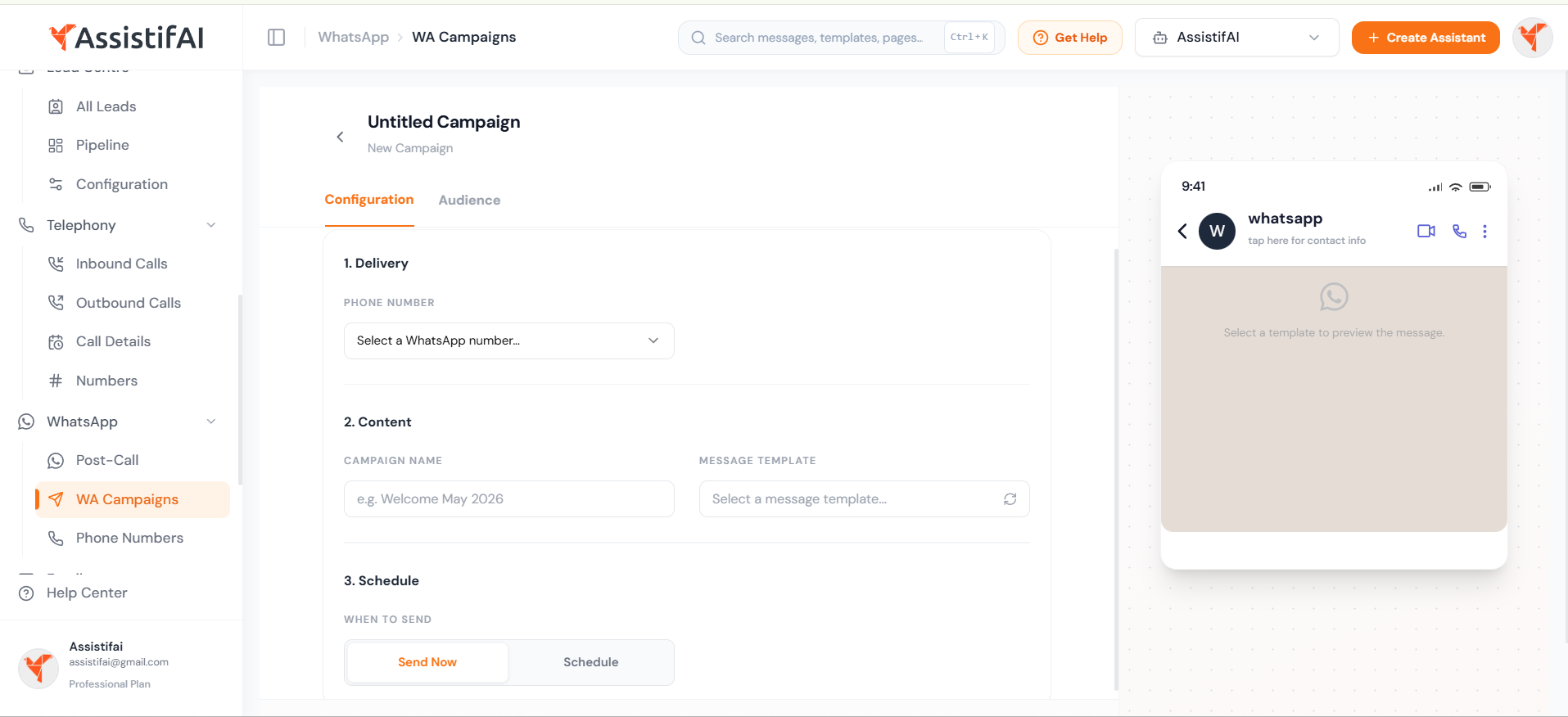
Step 1: Select your WhatsApp number
Under 1. Delivery, openthe Phone Number dropdown and select the WhatsApp number you want tosend the campaign from. This list shows all WhatsApp numbers connected to yourworkspace.
ℹ️ Note: If you don't see any numbers, go to WhatsApp → PhoneNumbers in the sidebar to connect one first.
Step 2: Name your campaign and choose a template
Under 2. Content:
Campaign Name — Give yourcampaign a descriptive name (e.g. "Welcome May 2026" or"Appointment Reminder Sept"). This is for your reference only;recipients won't see it.
Message Template — Selecta pre-approved WhatsApp message template from the dropdown. The phone previewon the right will update to show exactly how the message will appear torecipients.
💡Tip: Click the refresh icon next tothe template dropdown to reload the latest templates if you've recently createdor got one approved.
Step 3: Set the schedule
Under 3. Schedule, choosewhen to send:
Send Now — The campaignwill start dispatching messages immediately after you confirm.
Schedule — Pick aspecific date and time to send the campaign later. Useful for timingannouncements around business hours or specific events.
Audience
The Audience tab is where youadd the contacts who will receive this campaign. Switch to it by clicking theAudience tab at the top of the campaign builder.

Option A: Upload a CSV file
The fastest way to add contactsin bulk. Prepare a CSV file with your contact list, then either drag and dropit into the upload area or click to browse and select the file.
Your CSV must include at least aphone column. The name and email columns are optional but recommended forpersonalisation.
💡Tip: Click "Download SampleCSV" above the upload area to get a template file with the correct columnheaders.
ℹ️Format: Phone numbers should be ininternational format with country code (e.g. +919876543210 or 919876543210).The system will handle formatting.
Option B: Add contacts manually
For smaller sends or quicktests, you can add contacts one at a time:
1. Select the countrycode from the dropdown (defaults to your workspace region).
2. Enter the phone numberin the input field.
3. Click Add to add the contact to the campaign audience.
4. Repeat for eachadditional contact.
ℹ️ Note: If your message template uses variables (e.g. {{1}} forthe customer's name), select a template first in the Configuration tab. Once atemplate is selected, variable fields will appear next to the manual entryinput.
Sending the Campaign
Once you've configured the campaign and added your audience:
1. Review the phone preview on the right side of the Configuration tab to verify the message looks correct.
2. Confirm your audience count on the Audience tab.
3. Go back to Configuration and click Send Now (or confirm your scheduled time).
The campaign will appear in your dashboard list with a SENDING status, which will update to COMPLETED once all messages have been dispatched.
Monitoring Campaign Performance
After sending, return to the campaign dashboard to track performance. The aggregate stats bar updates in real time, so you can see delivery, read, and reply rates as they happen.
Delivery rate: Delivered÷ Sent. A low delivery rate may indicate invalid phone numbers in your audience.
Read rate: Read ÷Delivered. Tells you how many recipients actually opened your message.
Reply rate: Replied ÷Delivered. Indicates engagement. Replies are handled by your AI assistant automatically.
💡Tip: If you're seeing high failure rates, check that all phone numbers in your CSV include the correct country code and are active WhatsApp numbers.
Best Practices
Use approved templates wisely— WhatsApp enforces template quality. Templates with low engagement or highblock rates can get paused. Keep your messages relevant and valuable.
Segment your audience —Rather than blasting your entire contact list, create targeted campaigns forspecific groups (e.g. leads from last month, customers in a specific city).
Time your sends — Use theSchedule option to send during business hours in your recipients' time zone.Messages sent at 2 AM get ignored.
Test first — Use themanual contact entry to send a test campaign to yourself or your team beforesending to your full list.
Clean your contact list —Remove invalid or inactive numbers before uploading. High failure rates hurtyour WhatsApp Business API quality rating.
Troubleshooting
No WhatsApp numbers in thedropdown? Navigate to WhatsApp → Phone Numbers in the sidebar and connect anumber to your workspace first.
No templates available? Messagetemplates need to be created and approved through the WhatsApp Business APIbefore they appear in AssistifAI. Go to the Templates tab on the campaigndashboard to manage them.
Campaign stuck on SENDING? Largecampaigns may take a few minutes to process. If the status doesn't update after15 minutes, contact support.
High failure rate? Checkyour CSV for formatting issues — phone numbers must include the country codeand belong to active WhatsApp accounts.
"Select a template firstto add variables manually"? This message appears on the Audience tabwhen you try to add contacts manually without selecting a message templatefirst. Go to the Configuration tab and pick a template, then return toAudience.

