
AI Phone Receptionist: How to Handle Every Incoming Call, Route Queries, and Book Appointments Without Any Human Staff

TL;DR
Every missed call costs you a lead, a booking, or a paying customer. AI phone receptionists now handle the full call workflow. They don’t simply answer, but route, qualify, book, and follow up. Platforms like AssistifAI replace your fragmented stack of voice tools, CRMs, and follow-up workflows with a single system that runs without human intervention.
Most businesses treat a missed call as a minor inconvenience. No, it is not. It is a lead that calls your competitor next. This guide breaks down how AI phone receptionists work, which workflows they can own end-to-end, and what separates systems that just answer calls from ones that actually move business forward.
The Stakes: What Missed Calls Actually Cost You
Your business is losing money every time a call goes unanswered. According to a 2025 analysis, small businesses lose an average of $126,000 per year to missed calls, with each unanswered call representing up to $1,200 in lost revenue. And 93% of callers never ring back after hitting a busy signal, according to research from Bain.
That is not a staffing problem. It is a systems problem.
Hiring a full-time receptionist costs $45,000 to $65,000 annually when you include salary, benefits, and overhead. They work 40 hours a week. For the other 128 hours, your calls go to voicemail, and 80% of callers hang up without leaving a message.
An AI phone receptionist changes the math entirely.
How Does an AI Phone Receptionist Actually Work?
An AI phone receptionist is a voice-based AI system that answers inbound calls, understands caller intent using natural language processing, and performs actions such as routing calls, answering FAQs, qualifying leads, or booking appointments without human involvement.
It is not an IVR (interactive voice response) menu where callers press 1 for billing and 2 for support. Those systems frustrate callers. AI receptionists hold real conversations.
Key difference from older systems:
- IVR: Callers navigate menus by pressing buttons
- Live answering service: A human agent answers on behalf of your business
- AI phone receptionist: A trained AI agent understands natural speech, takes action, and updates your systems in real time
Modern AI voices are nearly indistinguishable from human voices. In 2025 blind tests, 85–95% of people could not tell the difference between an advanced AI voice and a live receptionist.
An AI phone receptionist works through four connected layers: listening, understanding, acting, and syncing.
Here is what happens on a single call:
- Call answered instantly: The AI picks up in under one second, any time of day.
- Intent detected: Natural language processing identifies the caller's intent (to book an appointment, ask a question, or be routed to a department).
- Action taken: The AI answers the query, routes the call, or books the slot directly into your calendar.
- Systems updated: CRM, calendar, and follow-up tools are updated automatically with no manual data entry.
The process is not scripted in the rigid sense. The AI can handle variations in phrasing, accents, and unstructured requests. A client who says, "The app keeps stopping after the most recent update," is handed over to the technical team and receives automatic updates.
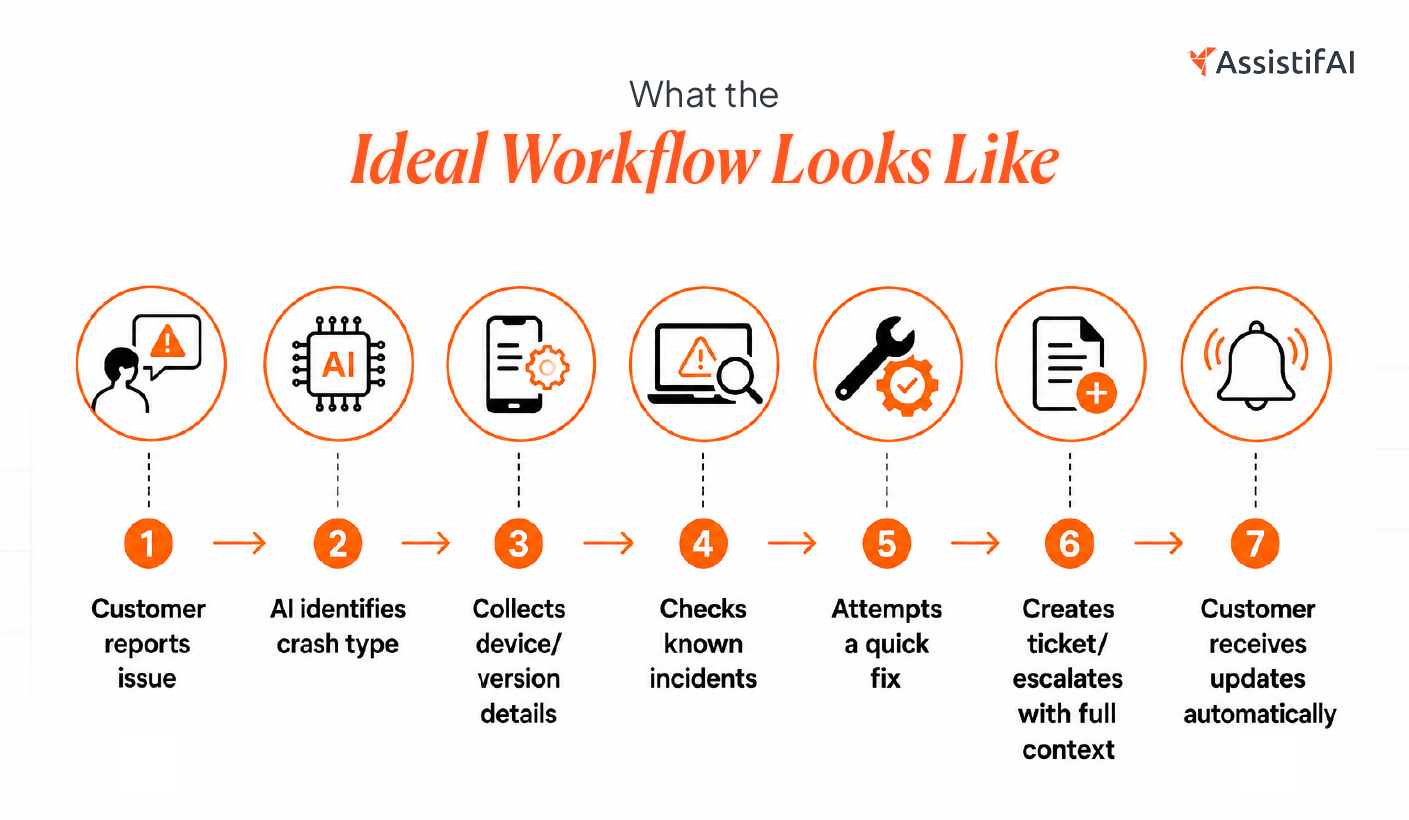
That is where AI support starts to feel useful rather than robotic.
Which Business Workflows Can an AI Receptionist Automate?
Most businesses run five separate tools to manage what an AI receptionist can handle in one place: a phone system, a CRM, a calendar, a follow-up tool, and an analytics dashboard. That fragmentation is where leads fall through the cracks.
Workflows an AI receptionist handles end-to-end:
- Call answering and routing: Directs callers to the right department, agent, or outcome based on their request.
- FAQ responses: Answer questions about hours, pricing, services, location, and policies without transferring the call.
- Lead qualification: Asks structured questions during the call to score intent, collect contact details, and tag leads in your CRM.
- Appointment booking: Checks live calendar availability and confirms bookings in real time.
- Missed call callbacks: Triggers an automated callback or follow-up message when a call goes unanswered.
- After-hours coverage: Handles the full workflow at 11 PM the same way it does at 11 AM.
According to McKinsey, adding an AI voice assistant to a call workflow reduced billing-related call volume by 20% and cut customer authentication time by up to 60 seconds per call. Those are not marginal gains for a small team.
Can an AI Receptionist Really Replace a Human at the Front Desk?
For routine, high-volume tasks, yes.
Here is an honest breakdown:
The realistic use case for most SMBs is not a full replacement. It is coverage for the 70–80% of calls that are routine, predictable, and repeatable, so your human staff can focus on the 20% that actually need them.
What Does Call Routing Look Like Inside an AI System?
Call routing in an AI system is intent-based, not menu-based. The caller says what they need, and the AI decides where they go.
How it works in practice:
- A caller says, "I want to reschedule my appointment." The AI pulls up their record and offers slots.
- A caller says, "I have a billing question." The AI answers if it can, or routes to accounts if it cannot.
- A caller says, "I need to speak with someone urgently." The AI flags it as high priority and either routes it to a live agent or sends an alert.
The routing logic is configured during setup. You define which intents map to which outcomes. Once live, it runs without manual oversight.
For businesses running multiple locations or departments, routing can also be done by geography, team, or service type, all triggered by what the caller says.
How Does Appointment Booking Work Without a Human Involved?
The AI checks your live calendar, offers available slots, confirms the booking, and sends a confirmation all within the call.
The booking flow step-by-step:
- Caller states intent ("I'd like to book a consultation")
- AI collects required info (name, reason for visit, preferred time)
- AI checks live availability in your connected calendar (Google Calendar, Outlook, Calendly, or your booking software)
- AI offers two to three available slots
- The caller selects a slot
- AI confirms the booking and sends a confirmation via SMS or email
- CRM is updated with caller details and booking status
This eliminates the back-and-forth that wastes 15–20 minutes per booking when done manually. It also captures after-hours bookings that would otherwise be lost. AI receptionists with 24/7 coverage help businesses capture 15–20% more appointments outside normal working hours.
What Is the Real Difference Between AI Phone Receptionists and Voice Bots?
The real difference is evident. Voice bots follow scripts. AI phone receptionists follow intent.
A voice bot breaks when the caller says something it did not expect. On the other hand, an AI receptionist handles variation, clarifies when needed, and completes the task. The underlying difference is natural language understanding versus keyword matching.
Where most voice bots fail:
- When the caller deviates from the expected script.
- When the caller uses informal language or speaks with an accent.
- When the caller asks a follow-up question mid-flow.
- When the caller changes their mind during the call.
A properly built AI phone receptionist handles all of these. It recovers from ambiguity, asks clarifying questions, and keeps the call moving toward a resolution.
Which Platforms Are Worth Evaluating for AI Phone Reception?
There are dozens of tools in this space. Most are strong in one area and weak in every other.
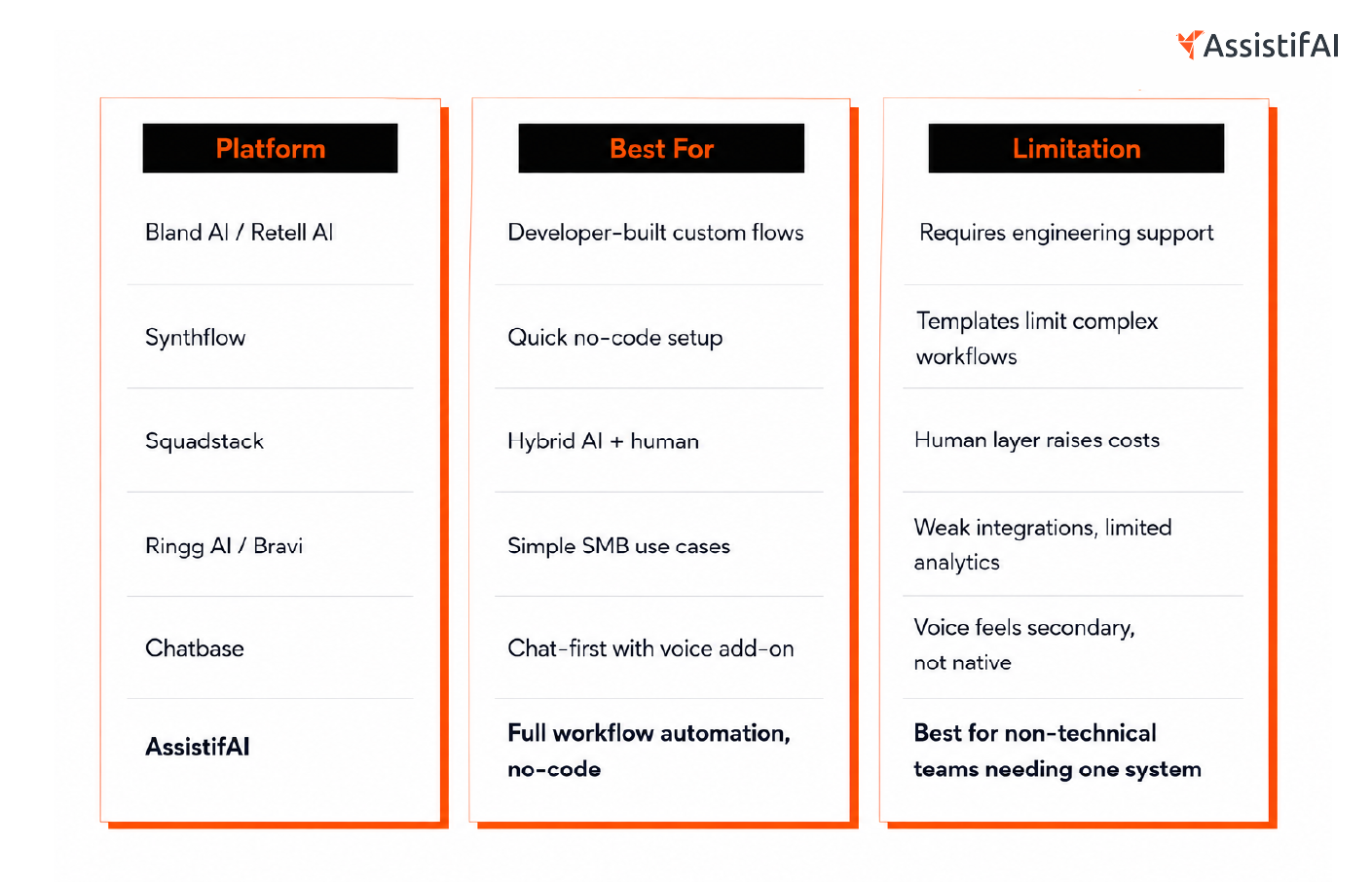
The core question is not "which tool answers calls best."
It is "which system handles everything that happens after the call is answered."
Most platforms stop at voice. The CRM update, follow-up, routing logic, and analytics revert to manual work. That is where the hidden cost lives.
AssistifAI is built differently. It combines voice, workflow execution, and follow-up on a single platform. Setup takes roughly 60 seconds using a website scan. No engineers required.
How Do You Choose the Right AI Phone Receptionist for Your Business?
Start with your call volume and your biggest bottleneck — not with features.
The right questions to ask before choosing a platform:
- How many calls do you receive per day, and what percentage go unanswered?
- What are the top five reasons people call you?
- Do you need the AI to book appointments, route calls, answer FAQs, or all three?
- What tools does it need to connect with (CRM, calendar, helpdesk)?
- Do you have a technical team, or do you need a no-code setup?
- What happens when a call needs a human? Is the escalation path clear?
Criteria that matter most:
- Native voice quality-Does it sound natural or robotic? Test it before committing
- Workflow depth-Can it update your CRM, trigger follow-ups, and log call data automatically?
- Integration breadth-Does it connect with your existing calendar and CRM without custom development?
- Analytics and visibility-Can you see where calls drop, what converts, and what fails?
- Onboarding support-Does the vendor help you set it up, or do they hand you a manual?
A system that answers calls brilliantly but leaves your team manually entering data and chasing follow-ups has not solved the problem. It has complicated it.
What Are the Most Common Mistakes When Deploying an AI Receptionist?
Most deployments fail not because the AI is bad, but because the setup is rushed.
The mistakes that cause the most damage:
- Launching before testing-Call your own AI and listen to how it sounds. If you cringe, your customers will hang up.
- Mapping too many intents at once-Start with one or two high-volume call types. Expand after you confirm accuracy.
- Ignoring call transcripts-Every conversation is data. Review the first two weeks of transcripts to find gaps in your script and routing logic.
- No escalation path-If a caller needs a human, the handoff must be instant and smooth. A dead end destroys trust.
- Forgetting after-hours context- Callers at 11 PM have the same expectations as callers at 11 AM. Make sure your AI handles both with the same quality.
- Treating it as a one-time setup- AI receptionists improve over time when workflows are refined based on real call data. Set a monthly review cadence.
One HVAC contractor missed 23 after-hours emergency calls in a single season. At $1,200 per job, that was $27,600 in revenue lost.
This happened not because of a bad system, but because of no system at all.
The Solution: A Phone System That Actually Works While You Sleep
Most small businesses are running on a broken call system. Calls go unanswered after hours, leads fall through because no one follows up, and the team spends time on calls that an AI could handle in seconds.
An AI phone receptionist does not just answer calls. It runs the entire first layer of your customer operations, including routing, qualifying, booking, and follow-up, without you touching the mouse.
The gap between businesses that capture every lead and those that lose them after hours is no longer a staffing gap. It is a systems gap.
See how AssistifAI handles this on one platform
FAQs
Can an AI phone receptionist handle calls for any industry?
Yes, with the right configuration. AI receptionists work across healthcare, legal, home services, real estate, retail, and professional services. The setup involves training the AI on your specific FAQs, services, and routing logic. Industry-specific platforms also exist for HIPAA-compliant healthcare or legal intake workflows.
What happens if the AI fails to deliver an answer to a caller's question?
A well-configured AI receptionist escalates to a live agent, sends an alert to your team, or schedules a callback. It all depends on how you set it up. The caller should never hit a dead end. Escalation paths are configured during setup and are critical to the caller experience.
How long does it take to set up an AI phone receptionist?
Basic setup on no-code platforms takes as little as 60 seconds using a website scan to generate initial responses. Full deployment with CRM integration, custom routing, and booking workflows typically takes one to three days. Developer-heavy platforms require more time and technical resources.
Will callers know they are speaking to an AI?
In 2025, advanced AI voices are nearly indistinguishable from human voices in blind tests, with 85–95% of people unable to tell the difference. However, regulations in some regions require disclosure. Check your local requirements and consider whether transparency aligns with your brand values.
How does an AI receptionist handle appointment booking without double bookings?
It connects directly to your live calendar (Google Calendar, Outlook, Calendly, or your booking software) and checks availability in real time before offering slots. Because it reads from and writes to the same calendar your team uses, conflicts are automatically prevented.
What is the cost difference between an AI receptionist and a human one?
A full-time human receptionist costs $45,000 to $65,000 annually, including benefits and overhead. AI receptionist platforms typically cost $600 to $3,600 per year for comparable or greater coverage. That is a saving of over $40,000 per year, and the interesting part is AI works 168 hours per week, not 40.

Read More Blogs

Your next hire isn't human.


AssistifAI automates your workflows and delivers exceptional voice and chat-based customer support helping your business grow faster, save time, impress clients, and stay ahead of the competition.