
What Is an AI Agent Platform? How to Choose, Build, and Deploy AI Agents for Your Business in 2026
TL;DR
Stop juggling 3 to 5 separate tools to handle a single customer journey, where nothing talks to anything else. Calls get missed. Follow-ups do not happen. Revenue leaks through every gap.
Businesses are replacing fragmented stacks with AI agent platforms that handle conversations, trigger workflows, qualify leads, and track outcomes, all from one system. The right platform answers calls, runs follow-ups, books appointments, and shows you exactly where leads drop off, without your team having to do it manually.
You probably already have an AI tool. You might have three. One for calls, one for follow-ups, one for reporting. And someone on your team is still manually connecting everything.
That is the problem an AI agent platform is built to solve. This guide breaks down what it actually is, how to evaluate one, and how to deploy it without disrupting the operations you already have running.
What Is an AI Agent Platform? (And What It Is Not)
An AI agent platform is a system that lets businesses deploy AI-powered assistants capable of completing tasks, not just answering questions. It handles conversations, triggers workflows, routes leads, and tracks outcomes across voice, chat, and messaging channels, from one spot.
This is entirely different from a chatbot. When a chatbot simply responds, an AI agent acts.
Most tools sold as "AI agents" are still rule-based bots with a language model on top. A real AI agent platform connects conversation to execution. When a customer calls, it does not just talk. It checks availability, books the appointment, sends a confirmation, and logs the entire interaction, without a human touch.
To put it in simple terms;
- AI chatbot: Answers questions inside a widget on your website.
- AI assistant: Responds to queries across one or two channels.
- AI agent platform: Executes tasks, triggers workflows, handles follow-ups, and tracks outcomes across all channels in one system.
Why Are Businesses Moving to AI Agent Platforms in 2026?
The core problem is fragmentation. Most SMBs and growing startups are running one tool for calls, one for CRM updates, one for follow-up sequences, and one for reporting. People are manually connecting it all.
According to a 2024 report by McKinsey, businesses that use three or more disconnected tools for customer operations spend up to 30% of staff time on coordination tasks that should be automated. That is not a tooling problem. That is a system problem.
When a lead calls and no one picks up, there is no automatic callback. When a message comes through WhatsApp, it sits in a separate inbox. When a follow-up is needed, someone has to remember to send it. Each gap is a lost conversion.
- Missed calls with no callback system = lost revenue
- Separate inboxes for each channel = context lost between interactions
- Manual follow-up dependency = inconsistent conversion rates
- No unified reporting = no visibility into what is working
AI agent platforms replace this stack with one execution layer.
What Does an AI Agent Platform Actually Do?
An AI agent platform handles four things: conversations, execution, conversion, and visibility. Most tools do one well. Few do all four.
Conversations means the platform handles voice calls, chat messages, WhatsApp, and Instagram from one place. Context carries across channels. A customer who called yesterday and is now messaging on WhatsApp receives a response that reflects the prior interaction.
Execution means workflows run automatically. A missed call triggers a callback. A new lead gets a follow-up without anyone manually scheduling it. A task moves forward without a manager chasing it.
Conversion means the platform qualifies leads during the conversation, books appointments in real time, and routes high-intent users to the right next step. No lag between conversation and action.
Visibility means you see exactly where leads drop, what converts, and when something fails. You get alerts, not surprises.
- Calls get answered without wait time or voicemail
- Follow-ups are sent automatically based on the conversation outcome
- Appointments are booked during the call, not after a back-and-forth
- Full journey tracking from first contact to closed deal
What Are the Must-Have Features Before You Commit to Any Platform?
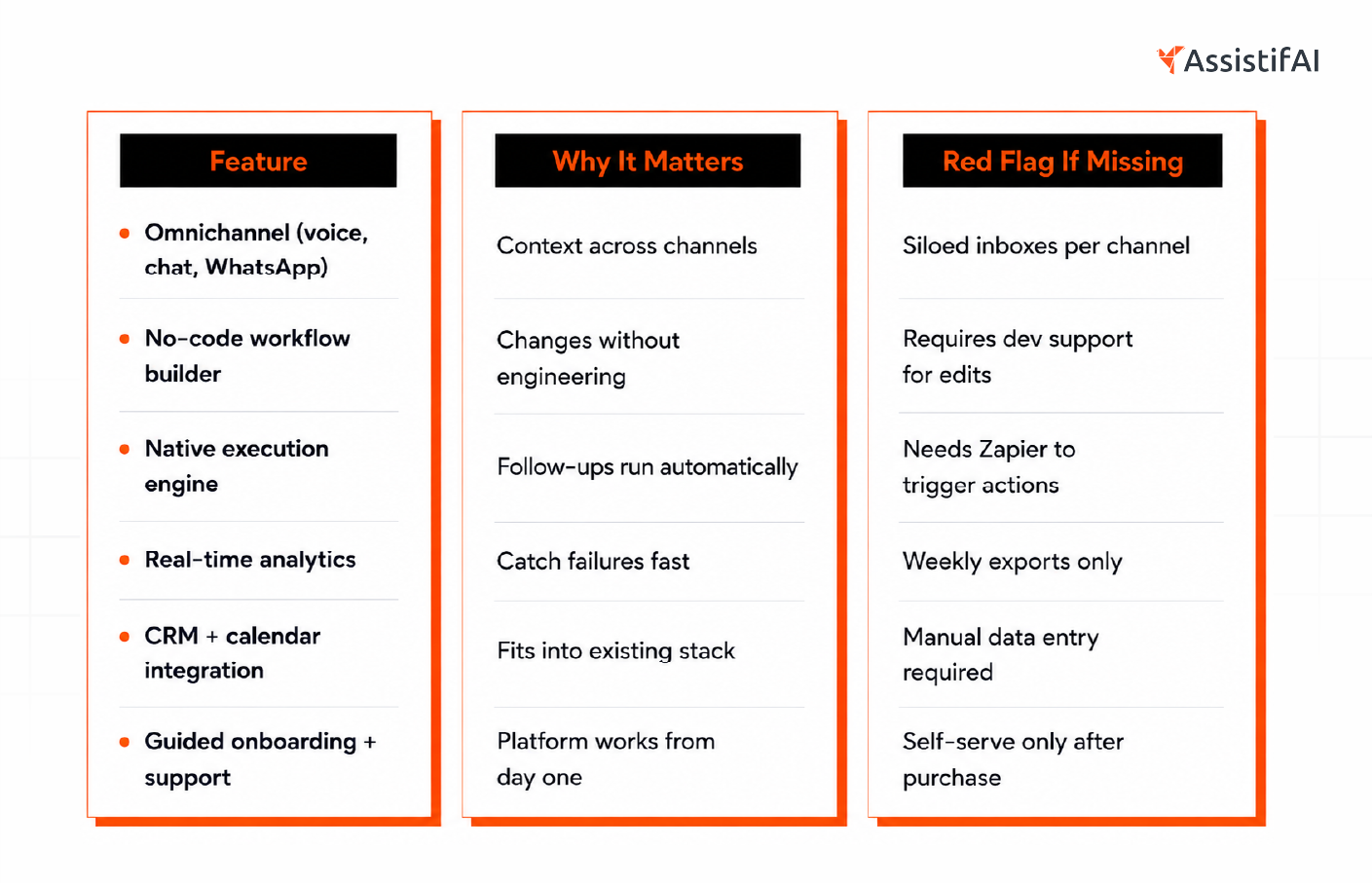
The most important thing to check is how well it executes in depth. A platform that handles conversation well but requires third-party tools for follow-up and reporting is not a platform. It is a channel with extras.
Features:
- Omnichannel deployment is non-negotiable. Voice, chat, WhatsApp, and Instagram should all work from the same system. Switching between dashboards defeats the purpose.
- No-code or low-code setup matters for non-technical teams. If you need an engineer to build a new workflow, the cost of using the platform increases whenever your process changes.
- Native workflow execution means the platform runs follow-ups, callbacks, and nudges without needing Zapier or Make to connect things. Native is faster, more reliable, and easier to debug.
- Real-time analytics shows you live data on call handling, lead status, and conversion rates. Historical reports once a week are not useful when a workflow breaks on Monday.
- Integration depth with your existing CRM, calendar, and telephony tools is what makes the platform usable in your actual operations.
Image content:
Should You Build or Buy an AI Agent Platform?
Buy unless you have a specialized AI engineering team, a use case that no platform covers, and a minimum of 6 months to build and test before you need results.
For most SMBs and startup founders, building from scratch is not a strategic decision. It is a delay that costs revenue while the team is still writing prompts and debugging integrations.
Building makes sense when your use case is highly specialized, your data is proprietary and cannot be shared with a third-party platform, and you have the engineering capacity to maintain it in the long term. Even then, most teams underestimate the ongoing cost of keeping a custom-built system up to date with model updates and API changes.
Buying gives you deployment in days, not months. It gives you a team that has already solved the integration problems you would spend weeks on. And it gives you a working system while you focus on the actual business.
Instead of asking "Can we build this?" Ask this: "What does building this cost us in revenue and time while we are not yet live?"
How Do You Deploy AI Agents Without Breaking Your Operations?
Deployment fails most often not because the platform is wrong, but because the workflow mapping was skipped. Before any AI agent goes live, you need to know exactly what it is replacing, what decisions it needs to make, and what it should hand off to a human.
Start with one workflow. The highest-volume, most repetitive one.
For most companies, that's inbound call handling or lead follow-up. Get that functioning before introducing new channels or complexity.
Step 1: Map your current workflow. Document what happens from first contact to conversion. Every step. Every manual hand-off.
Step 2: Identify what should be automated. Answering common questions, booking appointments, and sending follow-up messages. These should not require human involvement.
Step 3: Set escalation rules. Define when the AI transfers tasks to a human. High-value deals, complaints, and complex queries should always have a clear escalation path.
Step 4: Go live on one channel first. Voice or chat, not both at once. Get the workflow right before expanding.
Step 5: Monitor for the first two weeks. Check where conversations drop. Check whether follow-ups are being sent. Check whether bookings are completing correctly.
Step 6: Optimize and expand. Once one workflow runs cleanly, add the next channel or use case.
Good onboarding from a platform provider means they walk you through this. Bad onboarding means they hand you documentation and wish you good luck.
How is AssistifAI Different from Other AI Agent Platforms?
Most platforms are strong in one layer and weak in every other. The ones built for developers give you control but require engineering efficiency to maintain. No-code tools are quick to start but break down when workflows get complex. Hybrid models that mix humans and AI keep costs high and slow scaling.
AssistifAI is built around one premise: your operations should run on one system, not four. Conversations, follow-ups, workflows, and reporting all live in the same platform. There is no Zapier layer connecting things. There is no separate analytics tool. And there is no "figure it out yourself" after onboarding.
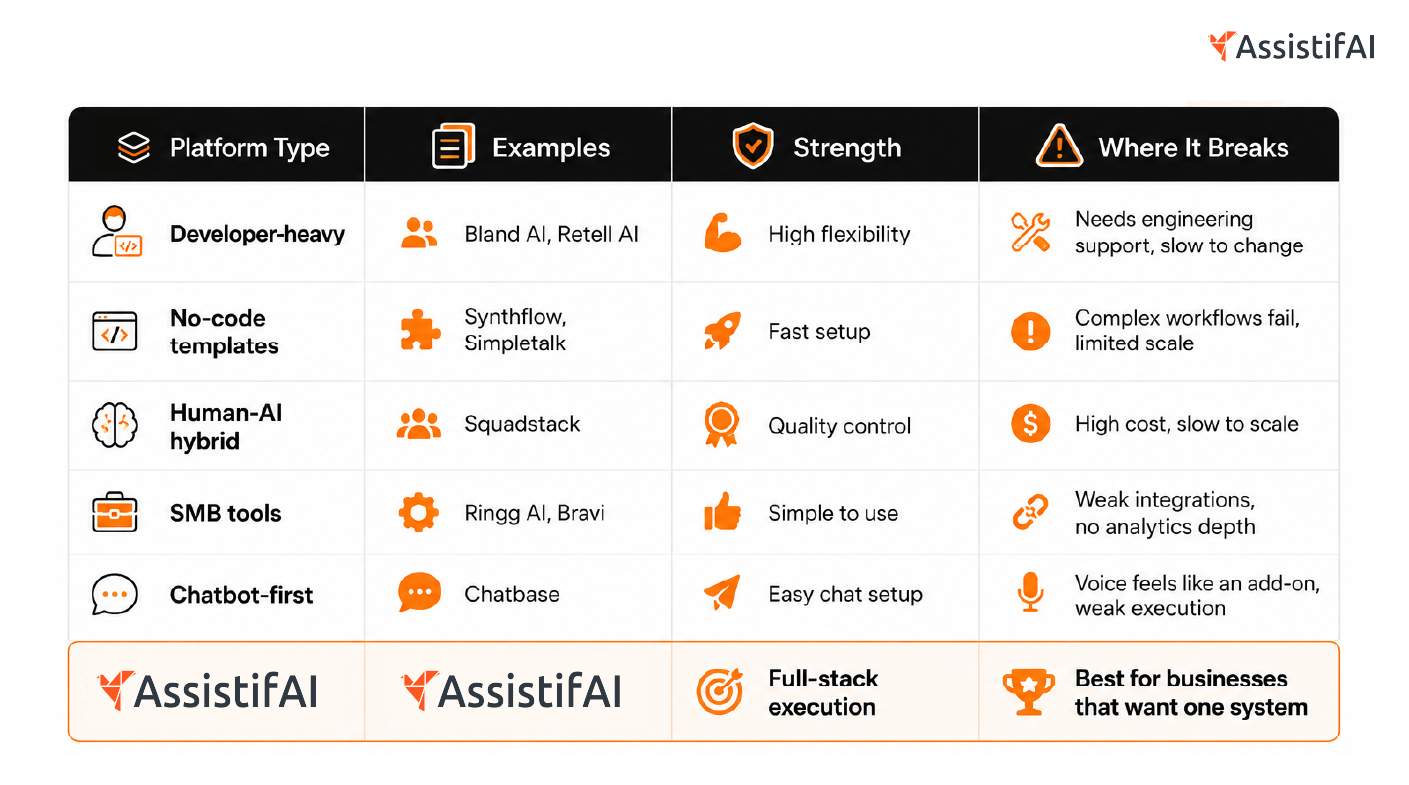
The core difference is that AssistifAI is not a conversation tool with workflow features bolted on. Execution is native. When a call ends, the follow-up triggers. When a lead qualifies, the appointment is booked. When something fails, you get an alert.
Most tools optimize conversations. AssistifAI optimizes outcomes.
The Bottom Line
Most businesses do not have an AI problem. They have a fragmentation problem. They are running separate tools for calls, CRM, follow-ups, and reporting, and people are manually connecting everything. That is where revenue leaks, leads go cold, and teams burn time on work that should not require a human.
An AI agent platform removes that layer. It does not just answer calls. It runs the system behind every call, every message, and every follow-up.
If you want to see what that looks like in practice, AssistifAI deploys an AI assistant from a website scan in under 60 seconds. From there, it handles conversations, triggers workflows, books appointments, and shows you exactly where your operations stand.
CTA: See how AssistifAI works in practice
FAQ
What is the difference between an AI agent and a chatbot?
A chatbot responds to inputs with pre-written or AI-generated text. An AI agent takes action based on the conversation. It books appointments, triggers follow-up sequences, updates records, and routes leads, without human involvement. The distinction matters because a chatbot handles a conversation. An AI agent completes a workflow.
Can a non-technical team deploy an AI agent platform?
Yes, if the platform is built for it. Platforms with no-code interfaces and guided onboarding allow operations teams to build and deploy workflows without writing code. The key question to ask vendors is whether you need engineering support to make changes after launch. If the answer is yes, the platform is not truly non-technical.
How long should you wait to deploy an AI agent for your business?
With a no-code platform and a clear workflow mapped out in advance, basic deployment can be completed in under 24 hours. Full deployment, including omnichannel setup, CRM integration, and workflow testing, typically takes one to two weeks. Platforms that claim five-minute deployment usually mean a demo environment, not a production-ready system.
What integrations should an AI agent platform support?
At minimum: your CRM, your calendar tool, and your telephony provider. Beyond that, look for native WhatsApp and SMS support, website chat integration, and webhook or API access for custom connections. Platforms that rely entirely on Zapier for integrations add latency and a failure point between your tools.
Is an AI agent platform worth it for small businesses?
Yes, specifically because small businesses cannot afford to have staff handling repetitive tasks manually. An AI agent platform that answers calls, books appointments, and follows up with leads replaces the work of one to two full-time staff members. The ROI is straightforward when you compare the cost of missed calls and unworked leads to the platform subscription cost.
How do I measure if my AI agent platform is actually working?
Track four numbers: call answer rate, follow-up completion rate, appointment booking rate, and lead-to-conversion rate. If your platform does not surface these metrics natively, you are flying blind. A working AI agent platform should increase the first three metrics within the first 30 days of deployment and show measurable impact on conversion within 60 to 90 days.

Read More Blogs

Your next hire isn't human.


AssistifAI automates your workflows and delivers exceptional voice and chat-based customer support helping your business grow faster, save time, impress clients, and stay ahead of the competition.